🧪 Professor Vacuumus
Deutsch · English · 🇫🇷 Le jeu existe aussi en français.
The VACUUBRAND trade show game: bring visitors to the booth, show products, collect contacts




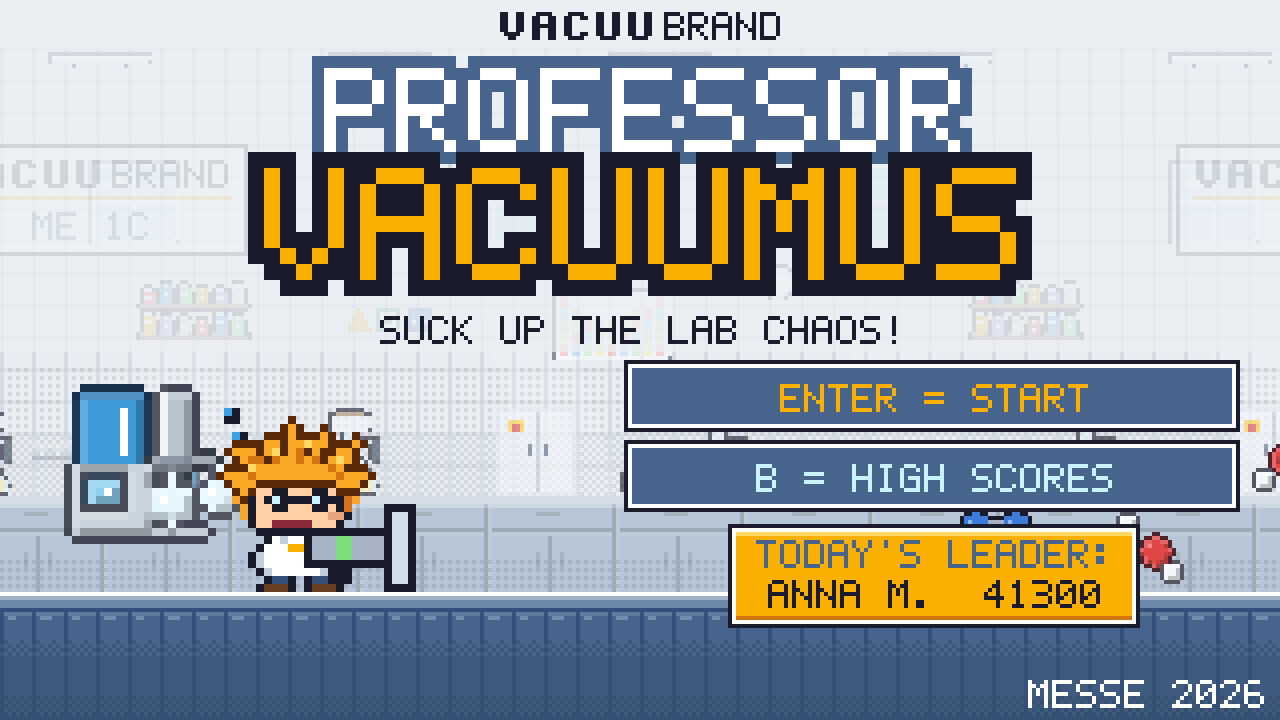
[!NOTE] 🧪 Try it online: gsb-deleven.github.io/vacuubrand-game The online version is for trying it out only. At the show, the offline version with registration and export is used: download.
Differences from the show version (expand)
🧪 Online test 🎪 Show version (offline) Start link in the browser download the ZIP, unzip, double-click the start file Registration nickname only first name, last name, company, email, consent Contacts / export none CSV/Excel export Admin area no yes, with PIN High scores only on your own device daily and show high scores at the booth Internet needed (when loading the first time) not needed The game itself same same With
?messeat the end of the link, the full booth version also runs online, e.g. on a tablet at the booth.
Contents
- What is it about?
- What's in it for VACUUBRAND?
- How a round works
- Five labs, five pumps
- Three languages, four countries
- Features
- High scores, leads and data protection
- Download
- What you need and where it runs
- Customisable for every show
- Next steps before the show
- Read more and get involved
🎯 What is it about?
Professor Vacuumus is a short platformer in the style of the old Nintendo games. A crazy lab professor with wild orange hair cleans up the lab with his suction gun. On his back he carries a VACUUBRAND pump, which gets stronger and stronger during the round.
A round lasts 2 minutes: long enough to be fun, short enough that no queue builds up at the booth.
Before playing, visitors register with their name, company and email. Whoever scores the most points wins a prize.
💡 What's in it for VACUUBRAND?
| 👀 Attention | A colourful demo runs on the screen all the time. It stands out in the aisle and draws people to the booth. |
| 📇 Leads | Every player enters first name, last name, company and email, with consent to be contacted. Newsletter sign-up is optional and recorded separately. |
| 🔬 Products explained through play | Each level is a real lab application with the matching pump. Visitors see ME 1C, BVC professional, PC 3001 VARIO select, MD 4C VARIO select and VACUU·PURE 10C in action. |
| 💬 Conversation starter | "Which pump did you have at the end?" is an easy way into a technical conversation. |
| 🏆 Coming back | There is a daily and an overall high score list. Anyone who narrowly lost often comes back. |
🕹️ How a round works
| 1. Choose country and language 🌍 Four flags (Switzerland, Germany, UK/Ireland, France), plus German, English or French. The country decides where the QR code at the end leads. |
2. Register 📝 First name, last name, company, email and the consent tick box, in the chosen language. In the background the professor is already sucking up lab chaos. |
 |
 |
| 3. Quick explanation 📋 One page shows the keys, pumps and safety gear. Then the game counts down 3, 2, 1. |
4. Play 🎮 Walk, jump and suck, with keyboard, gamepad, joystick or touch screen. Flask blocks release stronger pumps and safety gear. |
 |
 |
| 5. Result and medals 🥇 Points, time bonus, medals and the ranking for today and for the whole show. |
6. Contact 📲 A large QR code leads to the VACUUBRAND contacts in the player's country. It stays on screen until someone clicks on. |
 |
 |
| 7. High scores 🏆 Publicly only "First name + initial" is shown, no full names and no companies. |
8. And again from the start 🔁 Then the game returns to the title screen with the demo, ready for the next visitor. |
 |
 |
🧪 Five labs, five pumps
| Level | Pump | Application in the game |
|---|---|---|
| 1️⃣ Filtration lab | ME 1C | Filtration |
| 2️⃣ Cell culture lab | BVC professional with VHC hand piece | Liquid aspiration from well plates and Petri dishes |
| 3️⃣ Evaporation lab | PC 3001 VARIO select | Rotavap, vacuum concentrator, drying oven |
| 4️⃣ Chemistry lab | MD 4C VARIO select | Chemistry diaphragm pump for distillation and drying, the controller regulates automatically |
| 5️⃣ High vacuum pilot plant | VACUU·PURE 10C | Oil-free drying: freeze drying, Schlenk line, turbo backing |
At the end the steam kraken 🐙 is waiting. Only the VACUU·PURE 10C can handle it.
 1️⃣ Filtration lab with ME 1C |
 2️⃣ Cell culture lab with BVC professional |
3️⃣ Evaporation lab with PC 3001 VARIO select |
 4️⃣ Chemistry lab with MD 4C VARIO select |
 5️⃣ High vacuum pilot plant with VACUU·PURE 10C |
 🐙 Boss: steam kraken |
The platforms in the game are VACUU·LAN lines, and the VACUU·VIEW extended gives 10 extra seconds as a "time vacuum". This way further products appear along the way.
🌍 Three languages, four countries
The game runs in German, English and French (a wish of the UK team). Before every round visitors choose their country and language, which suits international shows:
- 🇨🇭 Switzerland (German, French or English), 🇩🇪 Germany, 🇬🇧 UK/Ireland, 🇫🇷 France
- The QR code at the end leads to the contacts for the chosen country
- The title screen is in English for everyone. Booth staff set the device language (preselection in the country selection) and the language of the admin area (German/English)
- The export contains the country and language of each player
- Without a country selection (quick start) the QR code leads to the contacts worldwide
- The QR codes can be checked on a separate page: qr/index.html
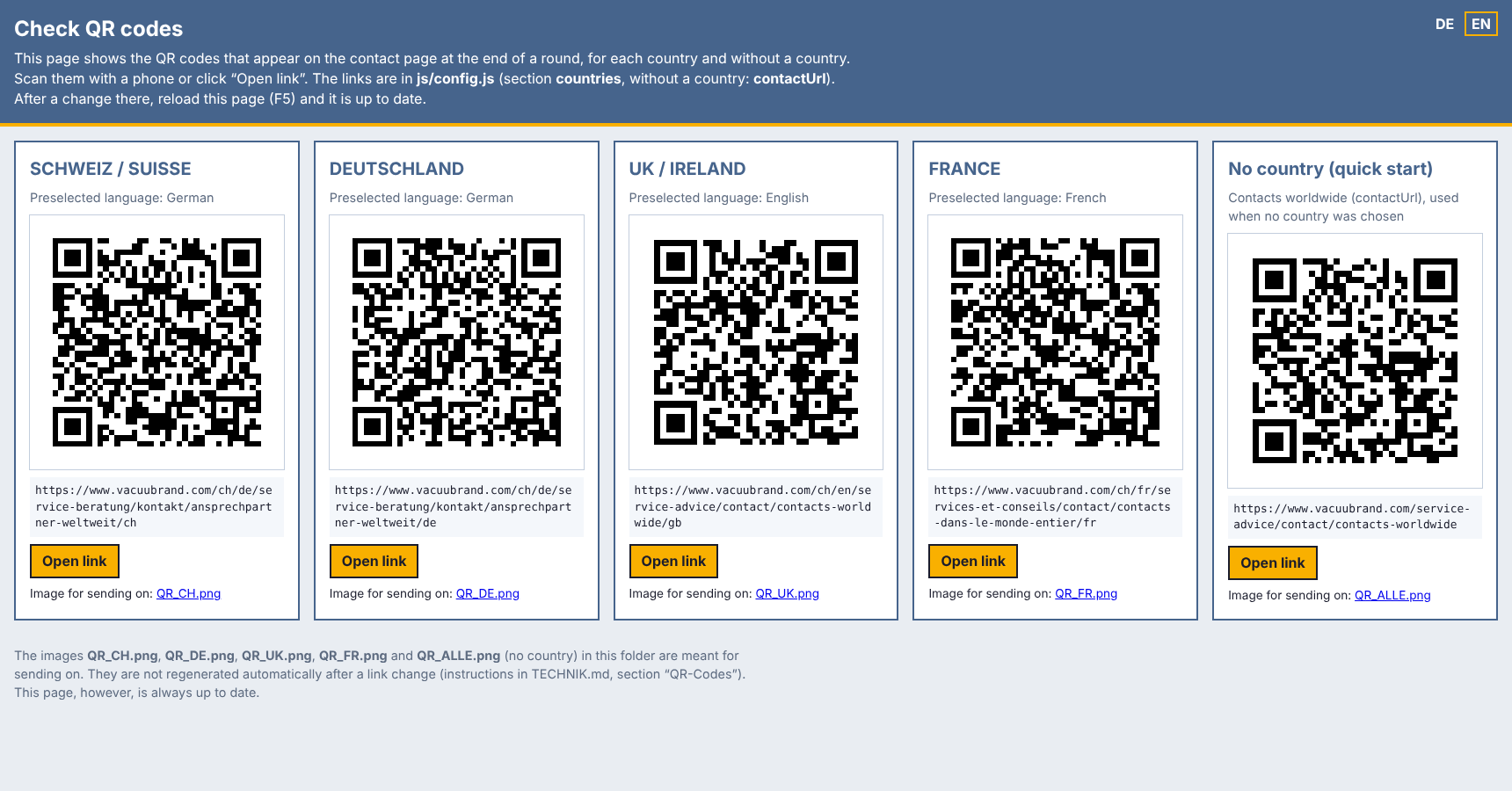
[!NOTE] The English and French texts are drafts and are still being reviewed by marketing (see TEXTE.md).
⭐ Features
🔋 Stronger pumps. Each new pump has more range and more suction power.
🦺 Safety gear. Safety goggles, gloves, safety helmet and safety shoes each give an advantage. Whoever has all four plays with "full protection". Lab safety becomes part of the game along the way.
🔥 Combo streaks. Sucking things up quickly one after the other gives up to eight times the points. A large golden box shows the streak and a running timer.
🥇 Six medals with bonus points, e.g. "Kraken beaten", "Full protection" or "Unharmed". So even after a good round there is still something to chase.
⏱️ Time bar. The remaining time runs down as a coloured bar, from green via yellow to red.
🎵 8-bit music and sound. Every lab has its own tune, the boss its own theme. When the professor is hit, he shouts "Ouch!".
🎮 Keyboard, gamepad, joystick and touch. An Xbox or USB controller is detected automatically. That looks better at the booth and spares the laptop keyboard. On the tablet, on-screen buttons appear.
🔬 Real lab enemies. Test tubes, Eppis, round flasks, well plates, solvent vapour and molecules such as H₂O, O₂, N₂ or ethanol as ball-and-stick models.
🏆 High scores, leads and data protection
High scores and prizes
- Daily high scores, so that there is a winner every day
- Overall high scores for the whole show for a main prize
- Anyone who plays several times counts with their best result
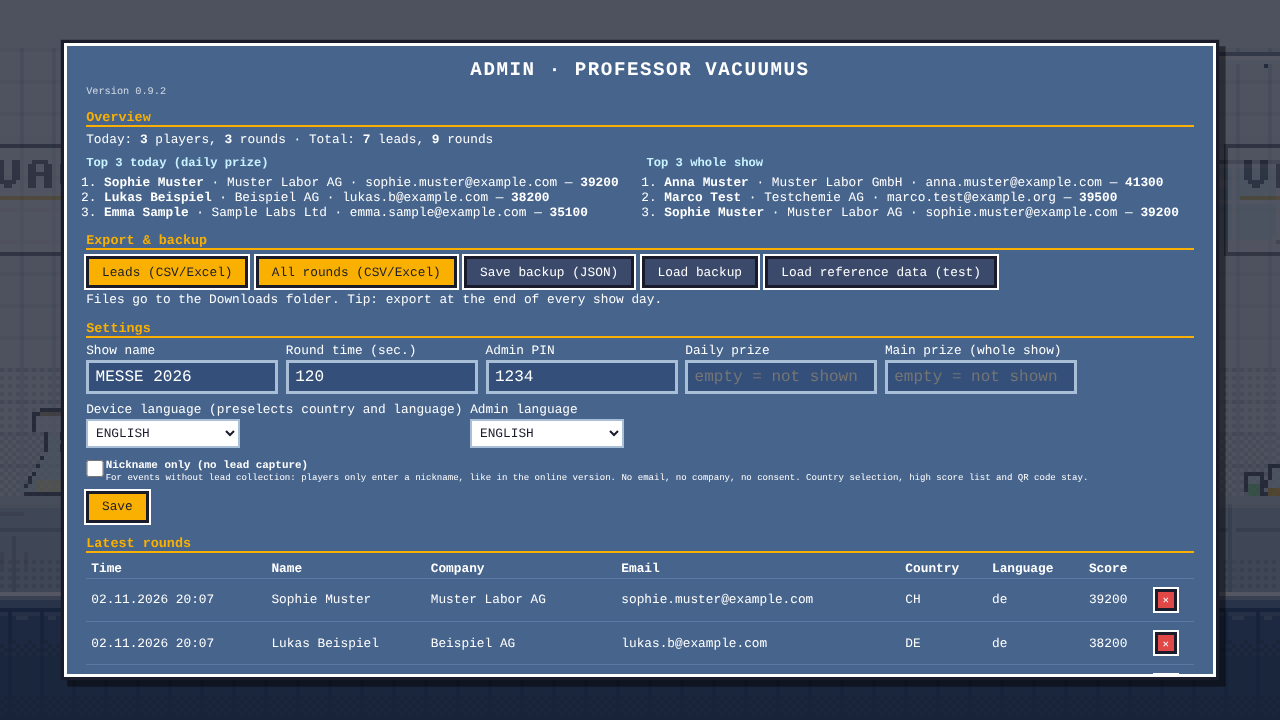
- In the admin area, booth staff see the top 3 of today and of the whole show with full contact details and can call or email the winners directly
Leads and data protection 🔒
- All data stays only on the show laptop. Nothing is sent to the internet.
- Export as an Excel file (CSV): one list with all contacts, one with all rounds played, each with country and language. The contacts can then go straight into the CRM or to sales.
- Consent is required, the newsletter is optional and ticked separately.
- After the show one button deletes all data.
- For events without lead collection there is a Nickname only switch in the admin area: people only enter a nickname and no contact data is captured. While it is on, the admin area shows a yellow warning bar.
[!IMPORTANT] The consent text should be checked by data protection before first use, for the UK/Ireland and France separately. It can be changed in a file, without programming skills.
⬇️ Download
The ready-made version to download: Professor Vacuumus, latest version
- Under "Assets" at the bottom, download
Professor-Vacuumus-v….zip. - Unzip it (Windows: right-click → "Extract All", Mac: double-click, Raspberry Pi: right-click → "Extract Here").
- Double-click the start file:
▶ START Windows.bat,▶ START Mac.commandor▶ START Linux + Raspberry Pi.sh.
Details and help if something does not start: GUIDE.en.md.
💻 What you need and where it runs
| 🖥️ Hardware | A normal company laptop or a tablet. Next to a large screen or TV it looks best. |
| 🎮 Optional | A USB gamepad or joystick |
| 📦 Installation | None. Download and unzip (or copy the folder), double-click, done. |
| 🌐 Internet | Not needed, the game runs completely offline |
| 💰 Licences | None. The game is developed in-house, without third-party software or subscriptions. |
| Device | How |
|---|---|
| 💻 Windows laptop | double-click ▶ START Windows.bat |
| 🍎 Mac | double-click ▶ START Mac.command |
| 📱 iPad / iPhone | open the online link, then Share → "Add to Home Screen": starts like an app in full screen, also offline |
| 🤖 Android tablet / phone | open the online link, menu → "Install app" |
| 🍓 Raspberry Pi / arcade cabinet | starts straight into the game when switched on, see raspberry-pi/README.md (German) |
| 🕹️ Joystick, gamepad, arcade buttons | plug in, done. If buttons are in the wrong place: Set up controller in the admin area |
On touch devices, on-screen buttons appear automatically: ◀ ▶ on the left to walk, JUMP and SUCK on the right.

| Version | Address | Purpose |
|---|---|---|
| 🎪 Show (laptop) | double-click the start file | booth with registration, high scores and contact export |
| 📱 Show (tablet) | gsb-deleven.github.io/vacuubrand-game/?messe | as above, but on the tablet. Open once, "Add to Home Screen", then it also works without Wi-Fi |
| 🧪 Online test | gsb-deleven.github.io/vacuubrand-game | for testing only: nickname only, no contact data, no data transfer |
⚙️ Customisable for every show
- Show name on the title screen (e.g. "ILMAC 2026")
- Round time
- Admin PIN
- Daily prize and main prize
- Texts of the registration and the consent, in three languages
- Device language, language of the admin area and the QR code links per country
- Pump slogans, points and time bonus
For events without lead collection there is a Nickname only switch in the admin area: people then only enter a nickname, like in the online version.
Show name, round time, PIN, prizes, languages and "Nickname only" can be set directly in the admin area, the rest in a well-commented settings file.
✅ Next steps before the show
- 🔒 Agree the consent text with data protection
- 🎁 Decide on the prizes (daily prize and main prize)
- 🖥️ Organise a laptop, screen and possibly a gamepad and test everything once
- 🔑 Change the admin PIN and give the booth staff a short briefing
- ✏️ Have marketing review the game texts: all texts with suggestions are in TEXTE.md
📚 Read more and get involved
| 📖 GUIDE.en.md | Guide for booth staff: starting, controls, flow, admin area, export, tips · 🇩🇪 ANLEITUNG.md |
| 🛠️ TECHNIK.md | Technical manual with structure, files and all settings (German) |
| ✏️ TEXTE.md | all game texts in German, English and French |
| 🍓 raspberry-pi/README.md | Raspberry Pi and arcade cabinet (German) |
| 💬 Discussions | loose ideas, questions and feedback after the show |
| ✅ Issues | concrete tasks, bugs and text changes, with templates |
| 🗂️ Project board and milestones | overview of what has to be done before the show |
| 🤖 @claude | mention it in an issue or comment (or set the label "claude"): Claude implements the task and proposes a pull request |
| 📖 Wiki | all guides in one place (German) |
All screenshots show invented sample data.